
There is a Non-ACH Report that will display the Net Payable amount for any Agents that are not to be paid via ACH. Comissio does not have a complete check register with the ability to create checks, but an Admin can export this report and use this to assist with paying Agents in an outside system.
Agents will be picked up in the Non-ACH Report who have made more than $0.00 Net when:
- The Tenant does not have ACH enabled for the company.
- The Tenant does have ACH enabled but one or more Agents are not set up with banking information.
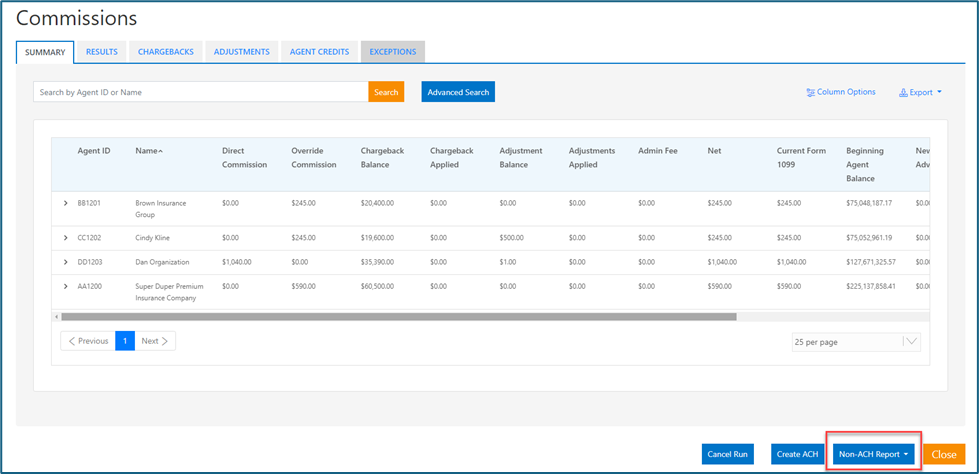
If one of those situations exists than the button for Non-ACH Report will be active in the Summary page of an open or closed commission cycle. Selecting the button will then provide choices for the report to be generated in excel or csv file formats.
If the Tenant has ACH enabled and all the Agents are set up with banking information, then the button will display as inactive. If all the Agents should be set up with banking information and the button is active it can function as an indicator that an Agent is not set up. When you select on Create ACH in this situation, Agents not set up will display warnings for those Agents. Creating the ACH file can continue without the Agents if desired, and in that case, the non-ACH report can be used to help with the payment process outside of Comissio for those exceptions.
The report can be exported in either excel or csv and will contain information on the Agent, their address, and their Net Amount.
Summary page from an open commission run with non-ACH report button identified:
Non-ACH Report export example
